
C++IO流
C++IO流
IO: 向设备输入数据和输出数据
C++的IO流设备: 文件、控制台、特定的数据类型(stringstream)

c++中,必须通过特定的已经定义好的类, 来处理IO(输入输出)
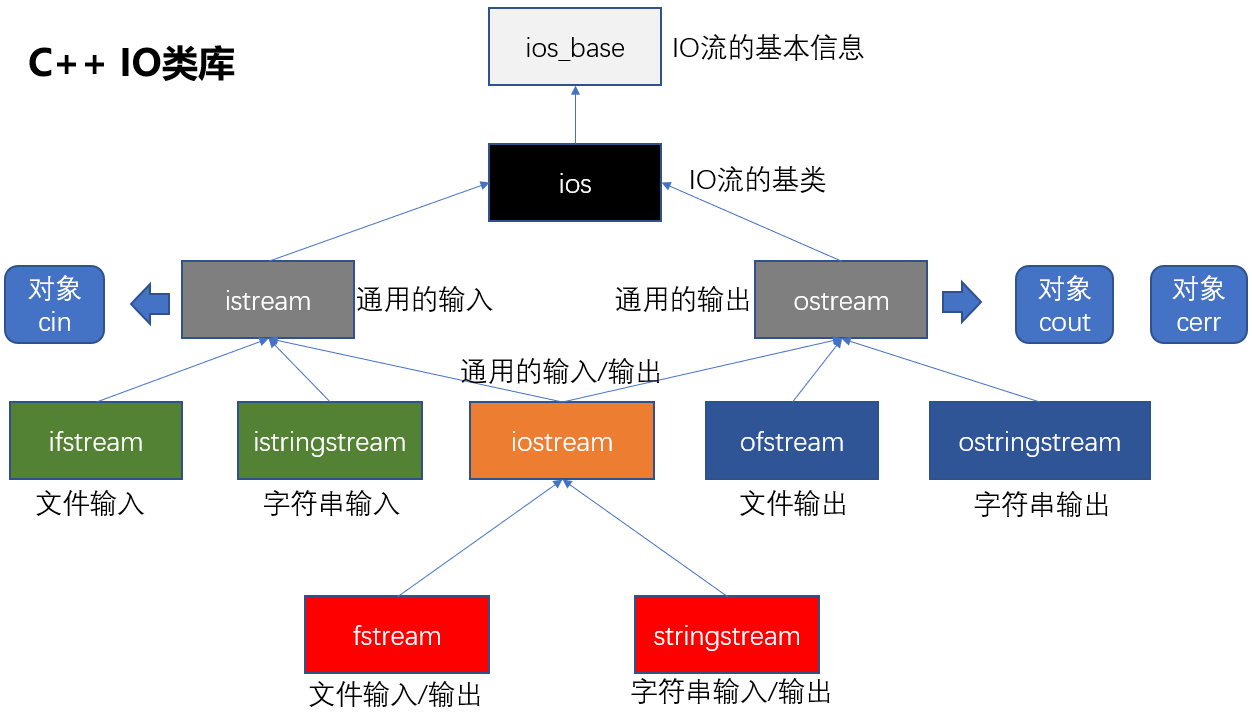
读写文件:文件流
文件流: 对文件进行读写操作
头文件: <fstream>
类库: ifstream 对文件输入(读文件)、ofstream 对文件输出(写文件)、fstream 对文件输入或输出
对文本文件流读写
文件打开方式:
| 模式标志 | 描述 |
| ios::in | 读方式打开文件 |
| ios:out | 写方式打开文件 |
| ios::trunc | 如果此文件已经存在, 就会打开文件之前把文件长度截断为0 |
| ios::app | 尾部最加方式(在尾部写入) |
| ios::ate | 文件打开后, 定位到文件尾 |
| ios::binary | 二进制方式(默认是文本方式) |
以上打开方式, 可以使用位操作 | 组合起来
写文本文件
| #include <fstream> #include <iostream> #include <string> using namespace std; int main() { string name; int age; ofstream outfile; //也可以使用fstream, 但是fstream的默认打开方式不截断文件长度 // ofstream的默认打开方式是, 截断式写入 ios::out | ios::trunc // fstream的默认打开方式是, 截断式写入 ios::out // 建议指定打开方式 outfile.open("user.txt", ios::out | ios::trunc); while (1) { cout << "请输入姓名: [ctrl+z退出] "; cin >> name; if (cin.eof()) { //判断文件是否结束 break; } outfile << name << "\t"; cout << "请输入年龄: "; cin >> age; outfile << age << endl; //文本文件写入 } // 关闭打开的文件 outfile.close(); system("pause"); return 0; } |
读文本文件
| #include <fstream> #include <iostream> #include <string> using namespace std; int main() { string name; int age; ifstream infile; infile.open("user.txt"); while (1) { infile >> name; if (infile.eof()) { //判断文件是否结束 break; } cout << name << "\t"; infile >> age; cout << age << endl; } // 关闭打开的文件 infile.close(); system("pause"); return 0; } |
对二进制文件流读写
思考:文本文件和二进制文件的区别?
文本文件: 写数字1, 实际写入的是 ‘1’。二进制文件:写数字1, 实际写入的是 整数1(4个字节,最低字节是1, 高3个字节都是0),写字符‘R’实际输入的还是‘R’
写二进制文件
使用文件流对象的write方法写入二进制数据
Demo
| #include <fstream> #include <iostream> #include <string> using namespace std; int main() { string name; int age; ofstream outfile; outfile.open("user.dat", ios::out | ios::trunc | ios::binary); while (1) { cout << "请输入姓名: [ctrl+z退出] "; cin >> name; if (cin.eof()) { //判断文件是否结束 break; } outfile << name << "\t"; cout << "请输入年龄: "; cin >> age; //outfile << age << endl; //会自动转成文本方式写入 outfile.write((char*)&age, sizeof(age)); } // 关闭打开的文件 outfile.close(); system("pause"); return 0; } |
读二进制文件
使用文件流对象的read方法.
| #include <fstream> #include <iostream> #include <string> using namespace std; int main() { string name; int age; ifstream infile; infile.open("user.dat", ios::in | ios::binary); while (1) { infile >> name; if (infile.eof()) { //判断文件是否结束 break; } cout << name << "\t"; // 跳过中间的制表符 char tmp; infile.read(&tmp, sizeof(tmp)); //infile >> age; //从文本文件中读取整数, 使用这个方式 infile.read((char*)&age, sizeof(age)); cout << age << endl; //文本文件写入 } // 关闭打开的文件 infile.close(); system("pause"); return 0; } |
对文件流按格式读写取数据
使用stringstream
按指定格式写文件
Demo
| #include <fstream> #include <iostream> #include <string> #include <sstream> using namespace std; int main() { string name; int age; ofstream outfile; outfile.open("user.txt", ios::out | ios::trunc); while (1) { cout << "请输入姓名: [ctrl+z退出] "; cin >> name; if (cin.eof()) { //判断文件是否结束 break; } cout << "请输入年龄: "; cin >> age; stringstream s; s << "name:" << name << "\t\tage:" << age << endl; outfile << s.str(); } // 关闭打开的文件 outfile.close(); system("pause"); return 0; } |
按指定格式读文件
没有优雅的C++解决方案, 使用C语言的sscanf
| #include <fstream> #include <iostream> #include <string> #include <sstream> #include <Windows.h> using namespace std; int main(void) { char name[32]; int age; string line; ifstream infile; infile.open("user.txt"); while (1) { getline(infile, line); if (infile.eof()) { //判断文件是否结束 break; } sscanf_s(line.c_str(), "姓名:%s 年龄:%d", name, sizeof(name),&age); cout << "姓名:" << name << "\t\t年龄:" << age << endl; } infile.close(); system("pause"); return 0; } |
文件流的状态检查
s.is_open( ) 文件流是否打开成功,
s.eof( ) 流s是否结束
s.fail( ) 流s的failbit或者badbit被置位时, 返回true
failbit: 出现非致命错误,可挽回, 一般是软件错误
badbit置位, 出现致命错误, 一般是硬件错误或系统底层错误, 不可挽回
s.bad( ) 流s的badbit置位时, 返回true
s.good( ) 流s处于有效状态时, 返回true
s.clear( ) 流s的所有状态都被复位
随机读写:文件流的定位
seekg
seekg( off_type offset, //偏移量
ios::seekdir origin ); //起始位置
作用:设置输入流的位置
参数1: 偏移量
参数2: 相对位置
beg 相对于开始位置
cur 相对于当前位置
end 相对于结束位置
demo
读取当前程序的最后50个字符
| #include <iostream> #include <fstream> #include <string> using namespace std; int main(void) { ifstream infile; infile.open("定位.cpp"); if (!infile.is_open()) { return 1; } infile.seekg(-50, infile.end); while (!infile.eof()) { string line; getline(infile, line); cout << line << endl; } infile.close(); system("pause"); return 0; } |
tellg
返回该输入流的当前位置(距离文件的起始位置的偏移量)
Demo
获取当前文件的长度
| #include <iostream> #include <fstream> #include <string> using namespace std; int main(void) { ifstream infile; infile.open("定位.cpp"); if (!infile.is_open()) { return 1; } // 先把文件指针移动到文件尾 infile.seekg(0, infile.end); int len = infile.tellg(); cout << "len:" << len; infile.close(); system("pause"); return 0; } |
seekp
设置该输出流的位置
先向新文件写入:“123456789”
然后再在第4个字符位置写入“ABC”
| #include <iostream> #include <fstream> #include <string> using namespace std; int main(void) { ofstream outfile; outfile.open("test.txt"); if (!outfile.is_open()) { return 1; } outfile << "123456789"; outfile.seekp(4, outfile.beg); outfile << "ABC"; outfile.close(); system("pause"); return 0; } |
常见错误总结
文件没有关闭: close(),可能导致写文件失败